Real-Time System in Practice (Part 2): From Events to Live System State
A real-time system is only useful when its internal state becomes continuously observable. As AkkaSync evolved, it became clear that emitting events alone was not enough. What mattered was how those events were continuously reduced into a consistent and observable system state.
A complete domain event model is rarely designed upfront. It usually emerges through continuous refinement as the system evolves. This makes flexibility and extensibility essential for the event-to-state mapping layer, allowing developers to adjust both the selected events and derived state without major refactoring.
Representing Live System State
Events represent facts that have occurred within the system, while system state reflects the information that stakeholders actually care about.
Clearly separating state by domain boundaries helps prevent the system state from becoming chaotic and difficult to maintain. Each state slice should focus on a specific concern and expose a well-defined view of that part of the system.
A practical approach to designing system state is to start from stakeholder concerns: identify the state they need to observe, then determine the events that drive those state changes, and finally organize both events and state around clear domain boundaries.
Example
In AkkaSync, the data synchronization engine I am building, Pipeline is one of the most important domain entities. Let’s use it as an example to explore how system state is defined and which events drive its transitions.
Separating Definitions from Runtime State
It is important to distinguish the Pipeline definition from the Pipeline state.The definition describes the static characteristics of a pipeline, including its identifier, source and target data sources, and plugin composition. These attributes provide structural context for the system, but they are not part of the live runtime state.
System State as User-Centric Metrics
System state is composed of user-facing metrics across different dimensions. Although these metrics may seem subjective, they are rooted in objective system behavior and provide a practical starting point for identifying domain events.
The Pipeline metrics listed below are intentionally flexible. They are expected to evolve continuously, with the only guiding principle being their relevance to user needs.
- Name / Identifier Represents the logical identity of a pipeline, used to correlate events and state across the system.
- TotalRuns The total number of execution cycles the pipeline has gone through, reflecting its historical activity.
- TotalProcessed The cumulative number of items successfully processed by the pipeline, representing throughput.
- TotalErrors The number of failed or rejected items during processing, used to measure execution quality and stability.
- LastRun The timestamp of the most recent pipeline execution, providing recency visibility.
- NextRun The scheduled or expected next execution time, if the pipeline is time-driven or scheduled.
- Status The current runtime state of the pipeline (e.g., Running, Idle, Failed), derived from live events.
- InstanceId The identifier of the current executing instance.
Driving State Changes Through Events
A running system continuously produces a large number of events. The key challenge is identifying which of these events are relevant to user-facing metrics and therefore should contribute to state changes.
Identifying and defining events is an iterative process. Different developers may arrive at slightly different event sets, but they should converge over time as the domain understanding matures.
The key principle is to keep events atomic. Combining multiple domain changes into a single “super event” should be avoided, as it introduces unnecessary coupling and reduces the flexibility of the state model.
Example
The state machine below effectively captures how different events drive changes in Pipeline metrics.
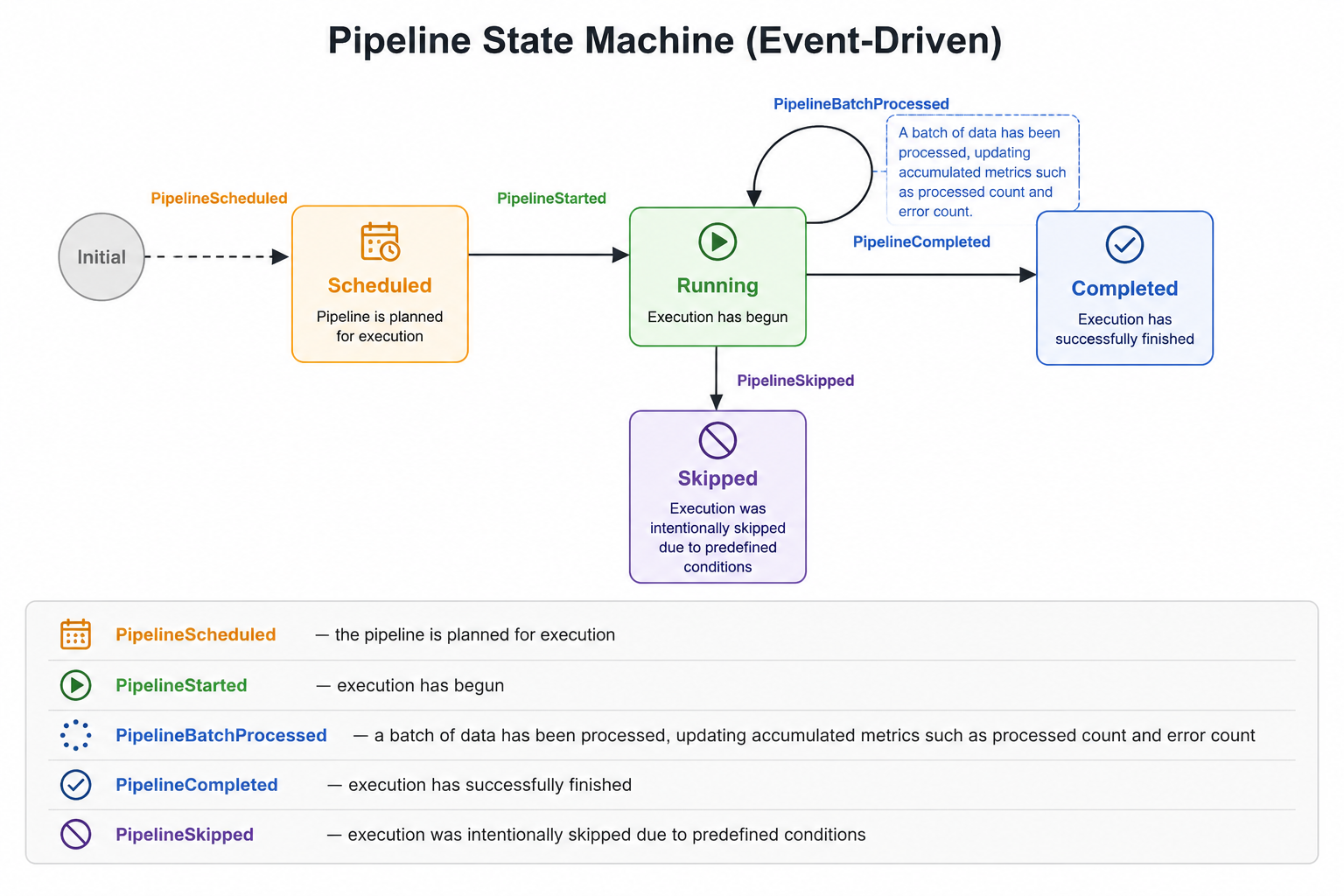
Some event definitions involve design trade-offs. For example, PipelineBatchProcessed reduces event frequency through batching. The system also aggregates per-ETL-plugin totals and error counts per Pipeline run. This is an iterative compromise and currently the simplest way I’ve found to represent Pipeline state in a meaningful, observable form.
Decoupling Event-to-State Mapping
Still using Akka.NET Sync as the example, to support system evolution, decoupling is a fundamental engineering necessity. In the event-to-state mapping context, the goal is to decouple the mapping logic from both the state structure and the triggering events. All events are processed uniformly through reducers, which are responsible for producing state transitions.
The model is built around three core abstractions:
ISnapshotdefines a snapshot of a specific aspect of system state.ISnapshotEventdefines an event carrying the payload required for state transitions. A single event may affect multiple snapshots.ISnapshotStoredefines a centralized snapshot repository responsible for storing, organizing, and providing access to snapshots produced by the system.
Reducers operate on these abstractions uniformly, enabling the event-to-state mapping process to remain independent from concrete state models and event types.
Events Supporting Multiple Snapshot Types
In practice, the system emits a large number of runtime events, but only a subset of them are relevant to state transitions. We first filter events that can lead to state changes.
A key observation is that a single event often affects multiple system states. To support this, ISnapshotEvent explicitly declares:
- the set of snapshot types it may impact (
SupportedTypes) - the identifiers of affected snapshots grouped by type (
IdGroups)
This allows each event to describe both what kinds of state it can influence and which specific instances within those states should be updated, enabling precise and multi-target state transitions.
The following PipelineStarted event is a good example.
public sealed record PipelineStarted(PipelineId Id, IReadOnlyDictionary<string, IPlugin> Plugins) : ISnapshotEvent
{
  public IReadOnlyList<Type> SupportedTypes { get; init; } = [ typeof(PluginInstance), typeof(PipelineMetrics)];

  public IReadOnlyDictionary<Type, IReadOnlyList<string>> IdGroups { get; init; } = new Dictionary<Type, IReadOnlyList<string>>
  {
    [typeof(PluginInstance)] = [.. Plugins.Select(p => p.Key)],
    [typeof(PipelineMetrics)] = [ Id.Key ],
  };
}
Reducer Design Conventions
A reducer is defined as a function that takes an optional existing snapshot, an event, and a snapshot identifier, and returns an updated snapshot. It also supports creating a new snapshot when none exists for the given identifier.
Func<ISnapshot?, ISnapshotEvent, string, ISnapshot> reducer;
Reducers are organized by domain, with each domain owning its own set of state transition rules. To manage multiple reducers in a unified way, a ReducerRegistry is introduced.
The registry maintains a mapping between snapshot types and their corresponding reducer functions, and provides a single entry point for applying events:
- It locates the appropriate reducer based on the target snapshot type
- It applies the event to the current snapshot (or creates a new one if needed)
- It returns whether a state transition has actually occurred
This design centralizes reducer management while preserving domain-level separation of state transition logic.
public sealed class ReducerRegistry
{
  private readonly IReadOnlyDictionary<Type, Func<ISnapshot?, ISnapshotEvent, string, ISnapshot>> _reducers;

  internal ReducerRegistry(IReadOnlyDictionary<Type, Func<ISnapshot?, ISnapshotEvent, string, ISnapshot>> reducers)
  {
    _reducers = new Dictionary<Type, Func<ISnapshot?, ISnapshotEvent, string, ISnapshot>>(reducers);
  }

  public bool TryReduce(Type targetType, string id, ISnapshot? current, ISnapshotEvent @event, out ISnapshot? next)
  {
    if (_reducers.TryGetValue(targetType, out var reducer))
    {
      next = reducer(current, @event, id);

      return current == null ? next != null : !ReferenceEquals(current, next);
    }

    next = current!;
    return false;
  }
}
A single reducer can handle multiple ISnapshotEvent types and apply state transitions across multiple ISnapshot implementations within the same domain.
The following example illustrates this design in practice. The SyncEngineReady event is handled by different snapshot reducers, where each reducer is responsible for a specific ISnapshot implementation.
At the same time, each reducer can handle multiple event types and apply corresponding state transitions based on event matching logic.
 public static class PipelineReducers
 {
   public static PipelineDefinition ReduceDefinition(PipelineDefinition? current, ISnapshotEvent @event, string id) => @event switch
   {
     SyncEngineReady ready => HandleSyncReadyForDefinition(current, id, ready),
     ...
   };

   public static PipelineMetrics ReduceMetrics(PipelineMetrics? current, ISnapshotEvent @event, string id) => @event switch
   {
     SyncEngineReady ready => HandleSyncReadyForMetrics(current, id, ready),
     PipelineStarted started => (current ?? new PipelineMetrics(id)) with { Status = PipelineStatus.Running, InstanceId = started.Id.RunId.ToString() },
     ...
   };
 }
Final Assembly
The components described above are composed into a unified event-to-state mapping pipeline.
ISnapshotEvent defines the scope of state changes, ISnapshot represents the state projections, and reducers define how events are transformed into state updates. The ReducerRegistry then acts as the execution layer that dispatches events to the appropriate reducers based on snapshot types.
Together, these elements form a decoupled and extensible system where events, state, and transition logic are cleanly separated, yet work together through a consistent runtime orchestration layer.
The assembly point should ideally be a unified place for handling ISnapshotEvents.
In AkkaSync, this responsibility is implemented in SyncGatewayActor. A dedicated gateway component is introduced as the central entry point for all ISnapshotEvents, where events are either processed directly or dispatched to the appropriate reducers. For implementation details, please refer to AkkaSync.
...
private async Task HandleSnapshotAsync(ISnapshotEvent @event)
{
  var nexts = new List<ISnapshot>();
  var idGroups = @event.IdGroups;

  foreach (var type in @event.SupportedTypes)
  {
    var currents = _snapshotStore.GetCurrentByType(type);
    var oldSnapshots = currents.Values.ToList();
    var ids = idGroups[type];
    var toRemove = new List<string>();
    foreach (var id in ids)
    {
      currents.TryGetValue(id, out var current);

      if (_reducerRegistry.TryReduce(type, id, current, @event, out var next))
      {
        if(next is null)
        {
          toRemove.Add(id);
        }
        else
        {
          nexts.Add(next);
        }

      }
    }
    if (toRemove.Count > 0)
    {
      _snapshotStore.RemoveRangeByType(type, toRemove);
    }
    if(nexts.Count > 0)
    {
      _snapshotStore.Update(nexts);
    }
    ...
  }
}
...
What’s Next
This part focuses on how system state is modeled and updated on the backend through a decoupled event-to-state mapping mechanism.
In the next part, we will explore how these state transitions can be efficiently and consistently propagated from the backend to the frontend, enabling a lightweight and reactive way to reflect state changes in the UI layer.