Streaming Progress Updates in Long-Running ASP.NET Core Requests
This is a feature recently implemented in our project to enhance the user experience. Some time-consuming requests, such as when the backend receives a file and processes its data according to business rules, often require users to wait for the processing to complete before performing other actions. Any operation that causes the interface to refresh during this process could interrupt the workflow and result in incorrect data. Additionally, for time-consuming requests, the frontend can appear “frozen,” which easily leads to user misoperations.
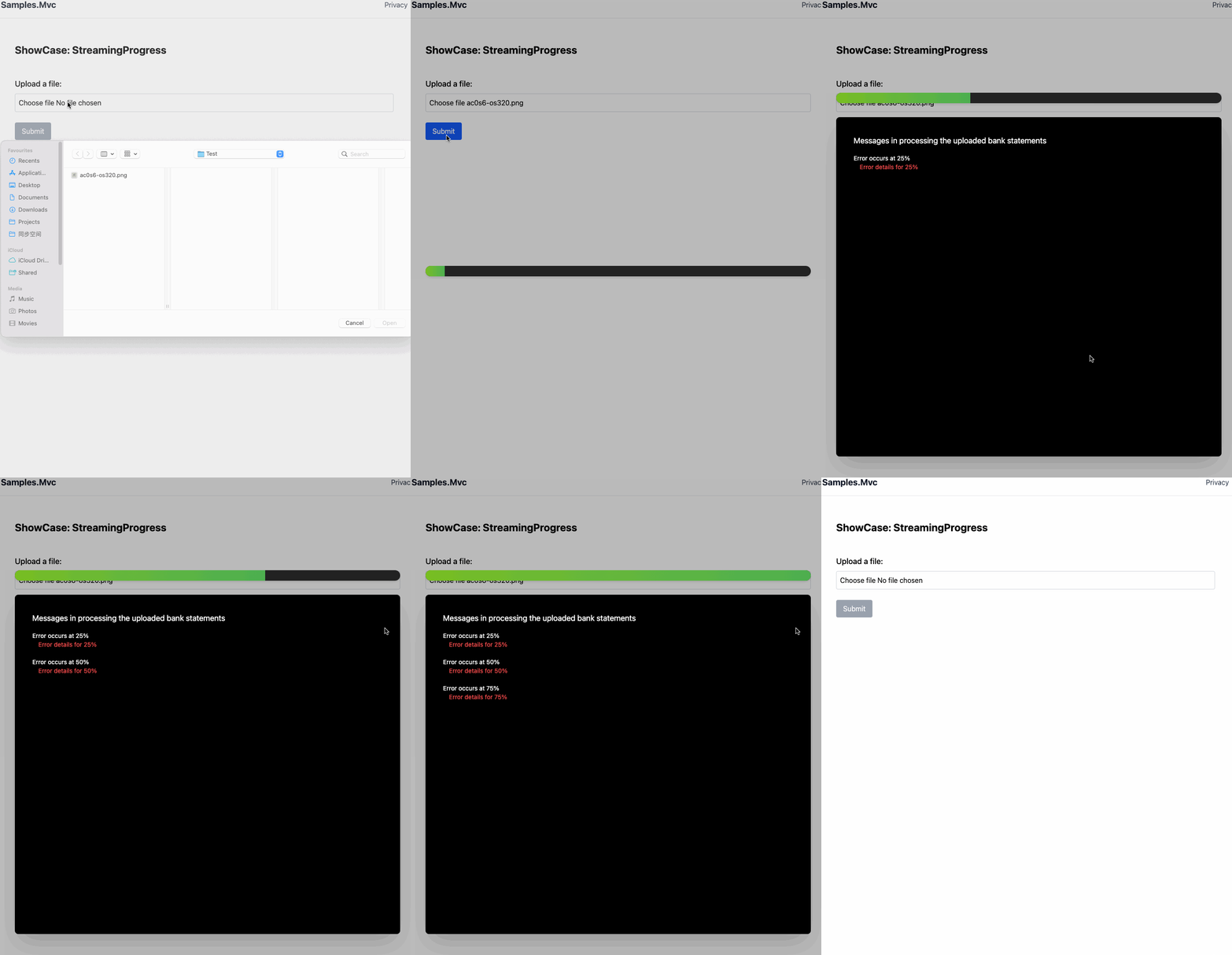
Therefore, when I suggested implementing a message window to display progress, error messages during processing, and completion prompts while blocking user interactions, the entire team immediately agreed. With the help of AI, this feature was quickly implemented, as shown in the image below.
Technologies Involved
Streaming Response
In ASP.NET, the response is backed by a stream for each request. Writing to this stream sends data to the client in chunks, either when the buffer fills or the response ends. Flushing the stream ensures buffered data is sent immediately. The server sends and the client receives data sequentially through a pipeline. As shown in the diagram below.
The following code implements a method for sending messages.
async Task FlushProgressMessage(dynamic message, CancellationToken cancellation)
{
  if(message == null || cancellation.IsCancellationRequested)
  {
    return;
  }
  var json = JsonSerializer.Serialize(message);
  var bytes = Encoding.UTF8.GetBytes(json + "\n");
  await context.Response.Body.WriteAsync(bytes, 0, bytes.Length);
  await context.Response.Body.FlushAsync();
}
Fetch & Parse Data
Although each message is flushed on the server side, the browser does not parse them individually and sequentially. For instance, receiving multiple JSON messages in a single read may cause parsing errors. Appending a delimiter to each message enables reliable, incremental parsing.
The following code implements the reading and parsing logic on the client side.
const reader = response.body.getReader();
const decoder = new TextDecoder();
let buffer = "";
while (true) {
const { done, value } = await reader.read();
if (done) break;
if (!value) continue;
buffer += decoder.decode(value, { stream: true });
let parts = buffer.split('\n');
buffer = parts.pop();
for (let part of parts) {
if (!part.trim()) continue;
try {
const message = JSON.parse(part);
if (message.Progress) {
dom.bar.style.width = `${message.Progress}%`;
}
if (message.Line) {
dom.content.style.display = 'block';
dom.stream.innerHTML += `<span>${message.Line}</span><br>`;
dom.stream.scrollTop = dom.stream.scrollHeight;
}
if (message.Error) {
dom.content.style.display = 'block';
dom.stream.innerHTML += ` <span style='color:#ff5252'>${message.Error}</span><br><br>`;
dom.stream.scrollTop = dom.stream.scrollHeight;
}
if (message.Information) {
dom.content.style.display = 'block';
dom.stream.innerHTML += `<span style='color:#4caf50'>${message.Information}</span><br>`;
dom.stream.scrollTop = dom.stream.scrollHeight;
}
} catch (err) {
console.error('JSON parse error:', err, part);
}
}
}
`
CSS Styling
The static CSS styles in this article are implemented using Tailwind CSS and AI-assisted generation. JavaScript dynamically manages style updates to control the progress bar, window visibility, closing actions, and related behaviors. See the source code for details.
Conclusion
Leveraging ASP.NET streaming responses with chunked data flushing enables efficient, incremental updates to the client. During the research of this solution, I learned that WebSocket can achieve the same purpose. I welcome readers of this article to leave comments and discuss different approaches.