Optimizing EF Core Includes with Split Queries: Lessons from Raw SQL Analysis
In EF Core, Include executes JOIN queries to load the main entity and its related data. Excessive or multi-level Include usage can easily lead to performance issues, such as join explosion and oversized result sets, placing significant strain on server resources. This article demonstrates how improper use of Include in EF Core can create performance bottlenecks and presents a practical optimization approach. The ER diagram below depicts the structure and relationships of the experimental data—a simplified version of the actual project schema, yet sufficient to illustrate the issue.
For a given Member ID, we retrieve the associated data from Profile, Dossier, DossierBiometric, and DossierBiometricImage.
Queries Relying Entirely on Include
This multi-level Include query returns a superset of the required data, resulting in a massively oversized result set.
var member = await _context.Members.AsNoTracking
    .Where(m => m.Id == memberId)
    .Include(m => m.Profile)
    .Include(m => m.Dossier)
        .ThenInclude(d => d.Biometrics)
            .ThenInclude(b => b.Images)
    .FirstOrDefaultAsync();
The above code will generate SQL statements of the following form.
SELECT [m].[Id], [m].[FirstName], [m].[LastName], [m].[Email], [m].[CreatedAt],
       [p].[Id], [p].[MemberId], [p].[Nationality], [p].[DateOfBirth], [p].[PhoneNumber], [p].[Address], [p].[JobTitle],
       [d].[Id], [d].[MemberId], [d].[ReferenceNumber], [d].[Status], [d].[CreatedAt],
       [b].[Id], [b].[DossierId], [b].[Type], [b].[CapturedAt], [b].[Notes],
       [i].[Id], [i].[DossierBiometricId], [i].[ImageData], [i].[Format], [i].[CreatedAt]
FROM [Member] AS [m]
LEFT JOIN [Profile] AS [p] ON [m].[Id] = [p].[MemberId]
LEFT JOIN [Dossier] AS [d] ON [m].[Id] = [d].[MemberId]
LEFT JOIN [DossierBiometric] AS [b] ON [d].[Id] = [b].[DossierId]
LEFT JOIN [DossierBiometricImage] AS [i] ON [b].[Id] = [i].[DossierBiometricId]
WHERE [m].[Id] = @memberId;
This query retrieves all data, and when the involved tables contain many columns, the result set becomes bloated with redundant fields in the form of a Cartesian product. In the result set shown below, the fields highlighted in red are non-redundant, while the other fields contain varying degrees of redundancy.
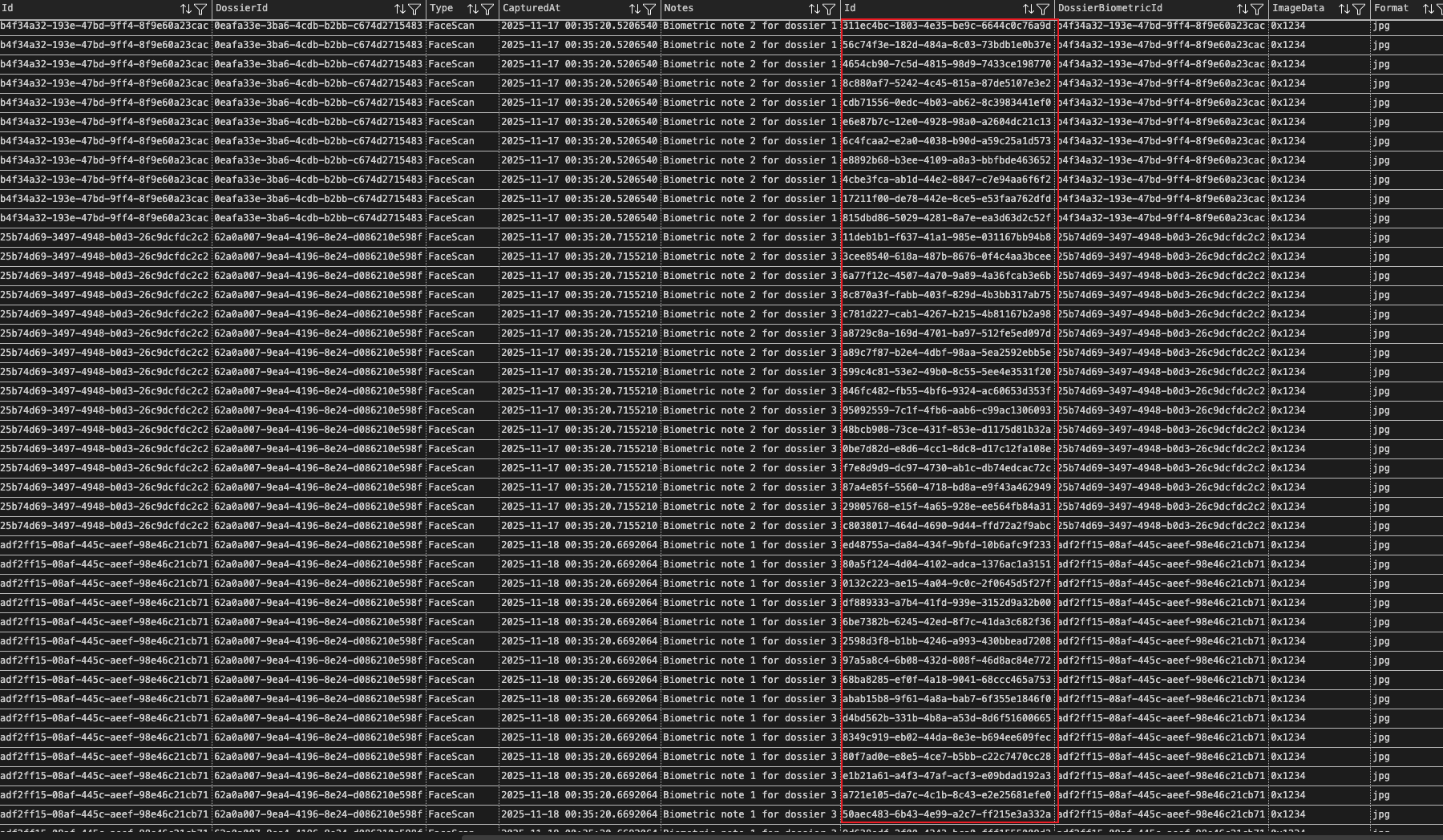
In real projects, involving more tables produces even larger result sets; excessive redundancy can cause timeouts, exhaust server resources, and severely impact service quality.
Splitting Queries for Better Performance
In practice, Member, Profile, and Dossier maintain a one-to-one relationship, so these three tables can be retrieved together using Include. The only redundant data are the foreign keys, which are negligible. Therefore, the query above can be split into two independent queries to reduce redundant data.
Query Member + Profile + Dossier
The following query returns only a single record, and we can use the Select method to project the data, retrieving only the fields required by the business logic. This effectively reduces the large amount of redundant data caused by the Cartesian product.
var member = await _context.Members
    .AsNoTracking()
    .Where(m => m.Id == memberId)
    .Include(m => m.Profile)
    .Include(m => m.Dossier)
    .FirstOrDefaultAsync();
The above code will generate SQL statements of the following form.
SELECT TOP 1 [m].[Id], [m].[FirstName], [m].[LastName], [m].[Email], [m].[CreatedAt],
       [p].[Id], [p].[MemberId], [p].[Nationality], [p].[DateOfBirth], [p].[PhoneNumber], [p].[Address], [p].[JobTitle],
       [d].[Id], [d].[MemberId], [d].[ReferenceNumber], [d].[Status], [d].[CreatedAt]
FROM [Members] AS [m]
LEFT JOIN [Profiles] AS [p] ON [m].[Id] = [p].[MemberId]
LEFT JOIN [Dossiers] AS [d] ON [m].[Id] = [d].[MemberId]
WHERE [m].[Id] = @memberId;
Query DossierBiometric + DossierBiometricImage
if (member?.Dossier != null)
{
    var dossierId = member.Dossier.Id;

    var biometrics = await _context.DossierBiometrics
        .AsNoTracking()
        .Where(b => b.DossierId == dossierId)
        .ToListAsync();

    var biometricIds = biometrics.Select(b => b.Id).ToList();

    var images = await _context.DossierBiometricImages
        .AsNoTracking()
        .Where(i => biometricIds.Contains(i.DossierBiometricId))
        .ToListAsync();

    foreach (var b in biometrics)
    {
        b.Images = images.Where(i => i.DossierBiometricId == b.Id).ToList();
    }

    member.Dossier.Biometrics = biometrics;
}
Split queries can return result sets with little or no redundancy, which are then assembled in memory into the data we need. The appropriate granularity of splitting is also worth considering. For example, if the related tables contain a large amount of data and the main table has many fields to retrieve, it is necessary to separate the queries for the main and related tables and assemble the data in memory. The assembled data does not necessarily follow the entity relationships of the underlying tables; in practice, DTOs are often used to hold data tailored for specific business scenarios.
Summary
In this article, we explored how naive use of multi-level Include in EF Core can lead to excessively large result sets and redundant data due to Cartesian product expansion. By analyzing the raw SQL generated by EF Core, we identified performance bottlenecks and demonstrated how splitting queries can significantly reduce redundant data. We also highlighted that the granularity and combination of split queries directly affect both query efficiency and the correctness of the assembled data.
In real-world projects, aggregating data after split queries is also an important task, and studying how to efficiently use LINQ to achieve high-performance data aggregation is a worthwhile topic. The following are the T-SQL scripts used in this article for experimentation. Download the T-SQL script for Include query experiment